



To Desmos or Not to Desmos?
Author: Thomas Skidmore
When it comes to the Digital SAT Math section, the most important number to remember isn’t 3.14, 180, or even 1600 – it’s 95. The section is split into two 35-minute modules consisting of 22 questions each, resulting in an average of roughly 95 seconds per question. A massive time-saver comes in the form of Desmos, the graphing calculator built directly into the Digital SAT’s testing app, Bluebook. This tool can be used on every question in the math section, but its limitations force you to decide whether it is the most efficient use of your already-limited time. Let’s dive deeper into when you should use Desmos, when you should do a problem by hand, and when a problem might require a combination of methods.
The DESMOS “Cheat Code”
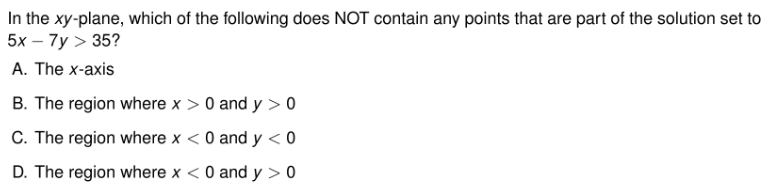
The question in this first example often leaves students staring blankly at their screen. Thankfully, DESMOS can make this question quick and easy.
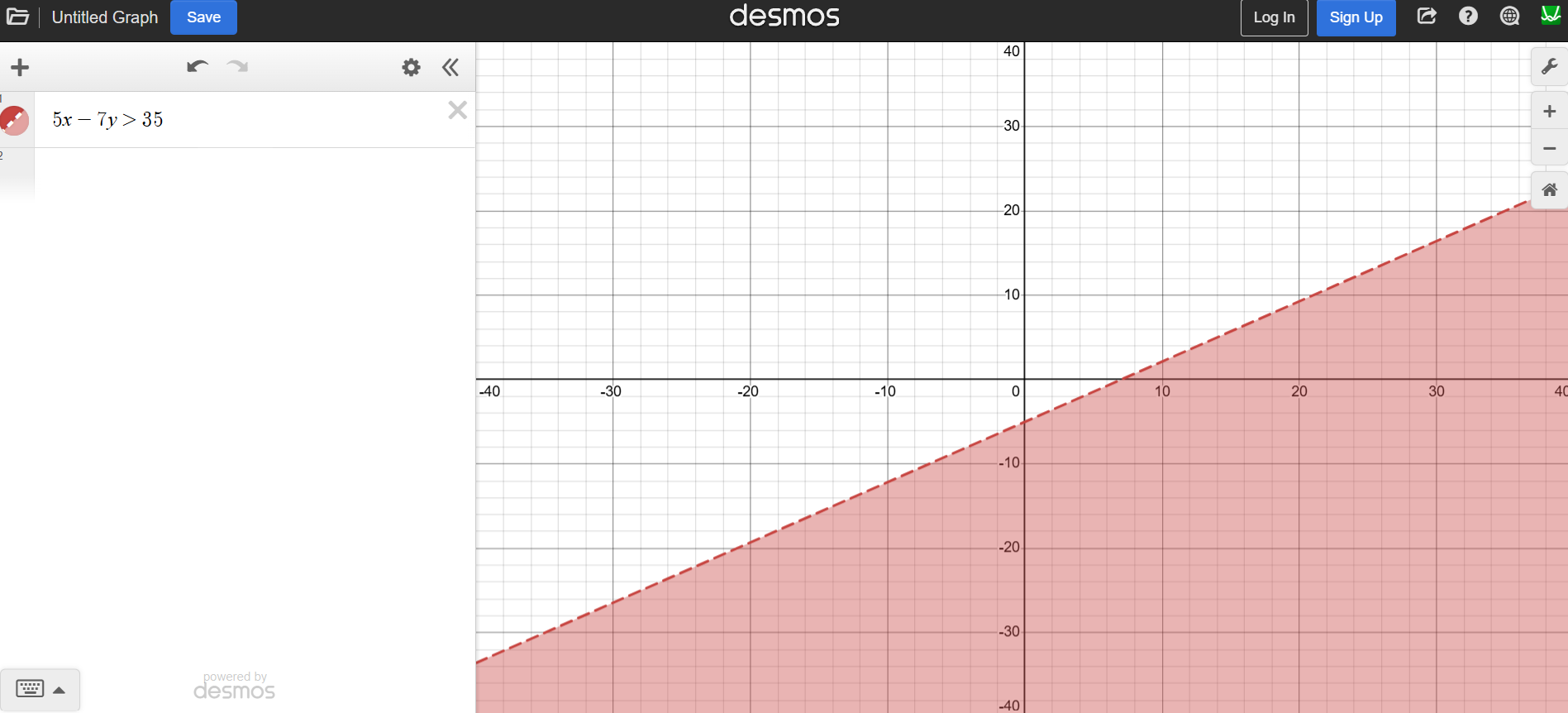
Plugging the inequality directly into DESMOS provides us with the graph that we can now reference while reviewing the answer choices. The unshaded areas of the graph occur in, mostly, the top left corner, which is also known as Quadrant 2. In this quadrant, the y-values are positive (y > 0) and the x-values are negative (x < 0). This gives us a correct answer of D. To solve this by hand, we would need to plug in values for x and y that match each answer choice, eventually finding out that when x < 0 and y > 0, the resulting inequality is untrue. This would not only take much longer, it would also widen the opportunities to make an algebraic mistake.
Let’s look at another example where DESMOS can help us save time and effort.

In this example, we have a system of equations, which is one of the best opportunities to use DESMOS. What happens when we plug the equations in, directly as shown?
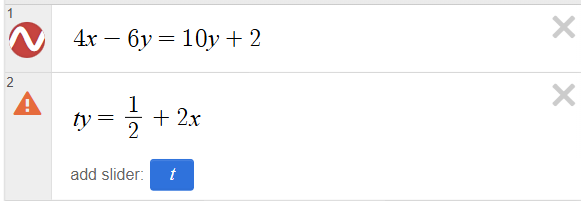
You may notice that the second equation gives a small warning sign. This is because we have not defined the variable, t, for DESMOS to recognize. Note that it prompts us to add a slider for t. If we click that button, this will enter into the third line.

There are a couple notable things to see here. First is that it sets t equal to 1, but we can click on and slide the small circle to change the value of t. When we do this, we can see what happens to the graph with each change. Another way to do this is by clicking the play button on the left side. This will automatically slide the slider back and forth for you while you can watch the resulting graph. Doing it this way will allow you to see what effect the variable has on the graph. Here’s the graph when t = 1.
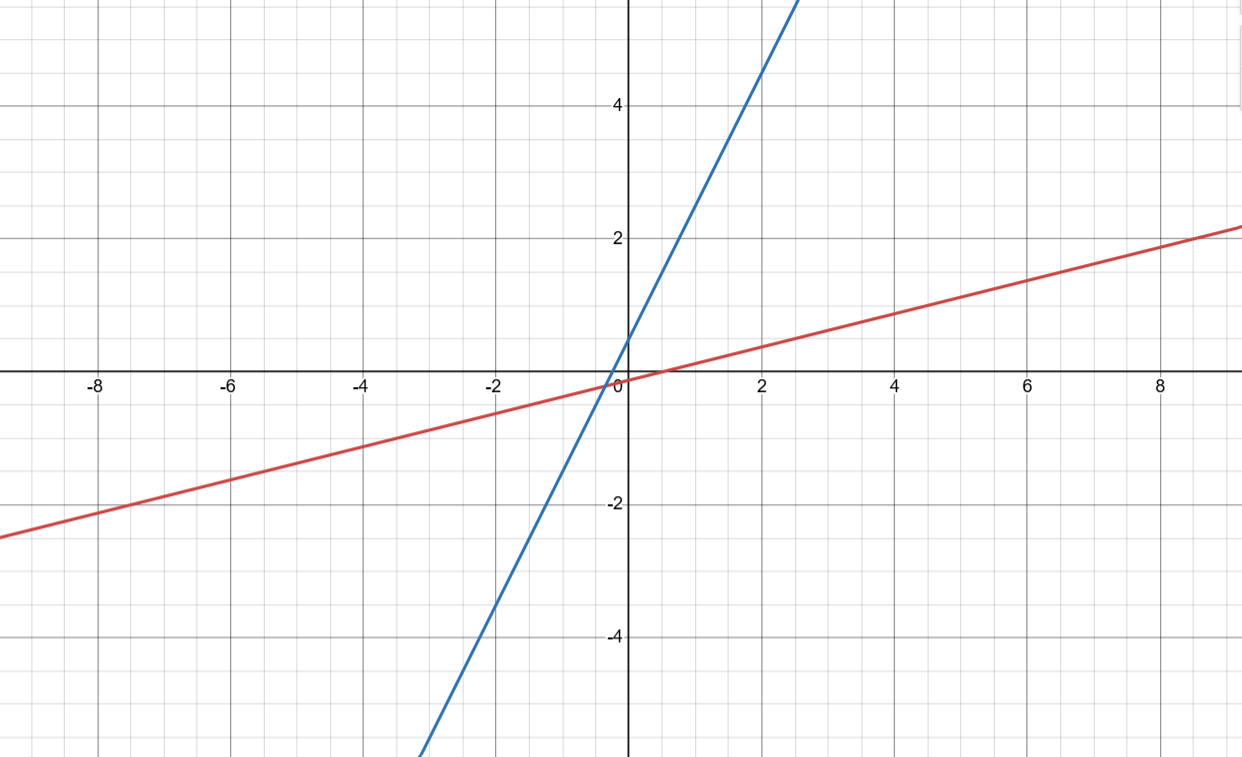
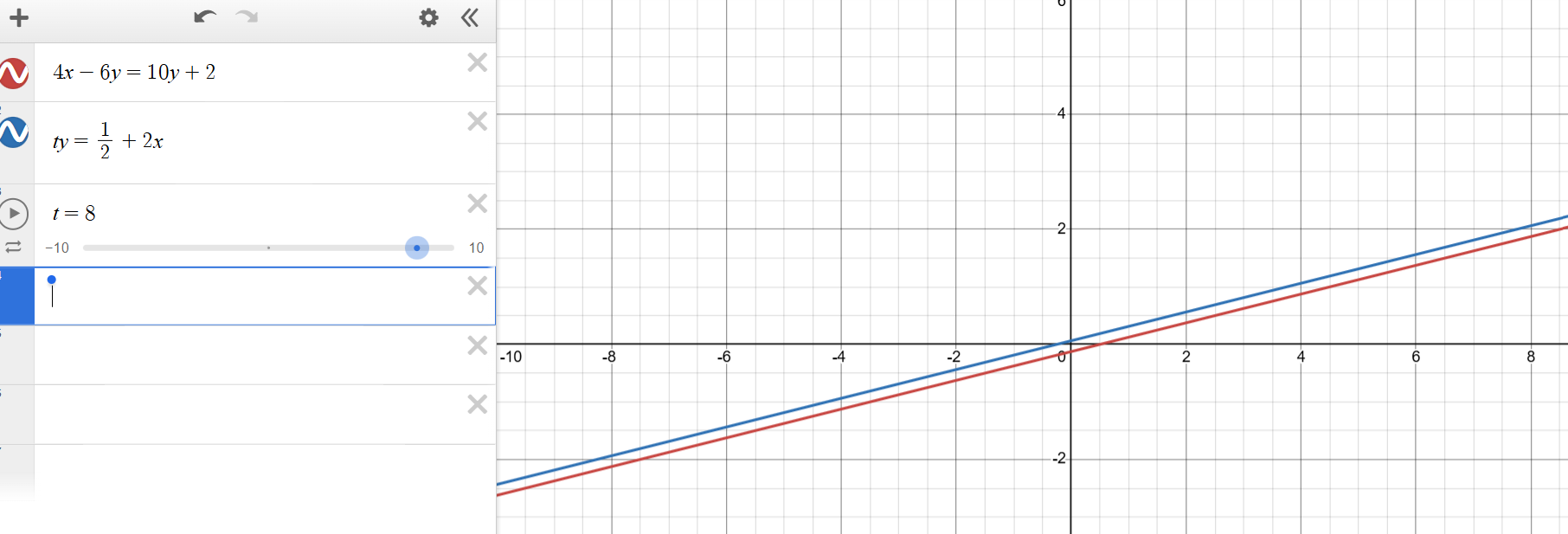
Looking back at the question, we are being asked for the value of t when the system has no solution. When a system of equations has no solutions, it means the lines are parallel and thus never touch. If we move the slider from t=1 to t=8, we notice that they become parallel lines. Our answer is t = 8.
A final way we will look at DESMOS is through regression.Often known as the “Tilde” Method, because we use this symbol, `, usually found in the top left of your keyboard, this method helps us to find multiple variables at a time.
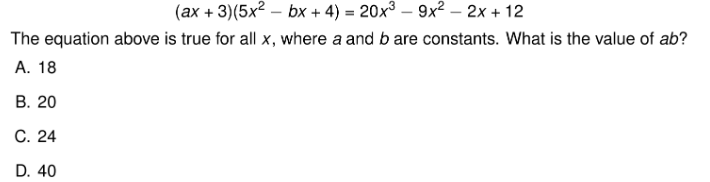
In DESMOS, we will input the question like so:
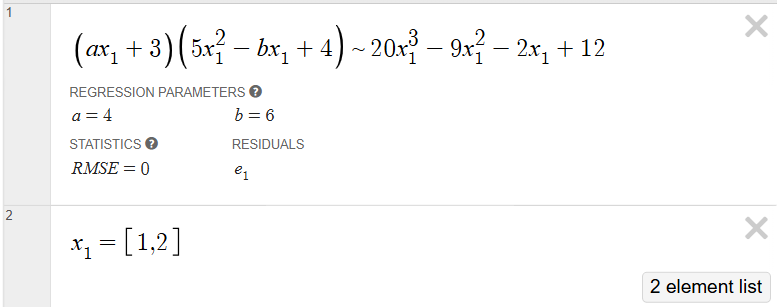
Notice that we changed x to x1 in every case it showed up, we changed the equal sign to the tilde as mentioned earlier, and we input a second line to tell DESMOS what values to consider for x1. These values do not matter – what does matter is that there is one value for each constant variable. In the question, the variables that represent constants are a and b, so we need two numbers in the list for x1. The final answer here would be 24, because we found a = 4, b = 6, and therefore ab = 4*6 = 24.
When to Solve by Hand
As we saw, DESMOS can be extremely helpful in the right circumstances. Occasionally, the question might be better answered by hand. Let’s look at some examples where you might want to skip out on the calculator and work through some simple algebra on your own.
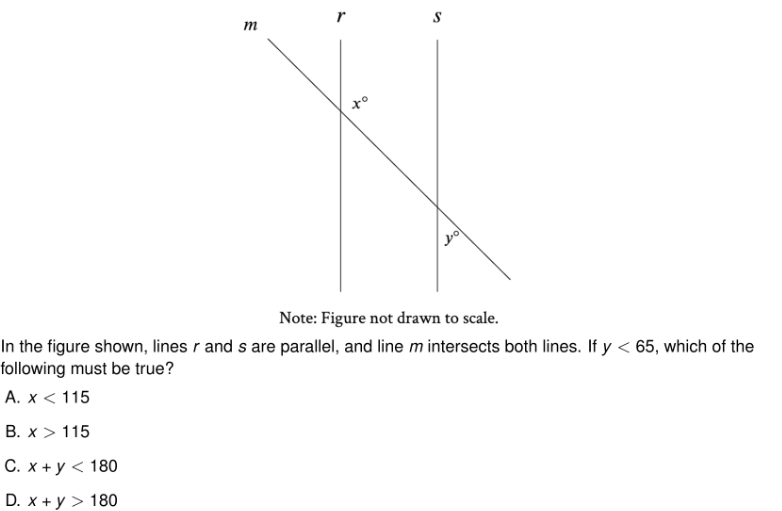
This is a prime example of when DESMOS cannot help you. Geometry is a topic that appears in many ways on the DSAT and, most of the time, you will want to answer the questions by hand. Here, we are given two parallel lines cut by a transversal and we’re being asked to compare the values of x and y. When given this situation, we can note that all of the acute angles are equal to each other and all of the obtuse angles are equal to each other. Thus, x is an obtuse angle, while y is an acute angle. Because of various geometry rules, these two add up to 180, so if y is less than 65, x must be greater than 115, in order to add up to 180. Our correct answer is B.
Another example of a Geometry question where DESMOS is unable to assist you:

We are unable to tell DESMOS the circumference and how to find the diameter, so we must do this by hand. The equation for circumference is C = ℼd. If the given circumference is 31ℼ, then 31ℼ = ℼd, which gives us d = 31. Our diameter is 31.
Here is another example.
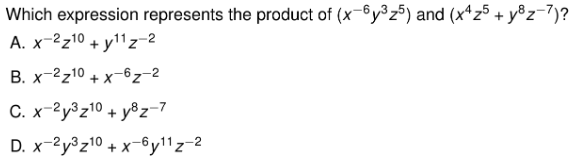
In this example, we may be tempted to use DESMOS because of all of the variables. However, our best bet is to simply distribute and add the exponents using exponent rules. Distributing the first expression to the first term of the second expression gets us this:

This eliminates answer choices A and B. Let’s distribute to the final term:

Our correct answer is D.
Translator vs Solver
The final example we want to take a look at involves setting up the problem first by hand and then using DESMOS to compute the answer. DESMOS struggles to translate problems, but is very good at solving them. If we are able to translate DSAT problems using our own algebra skills, we can then save time by plugging equations into DESMOS.
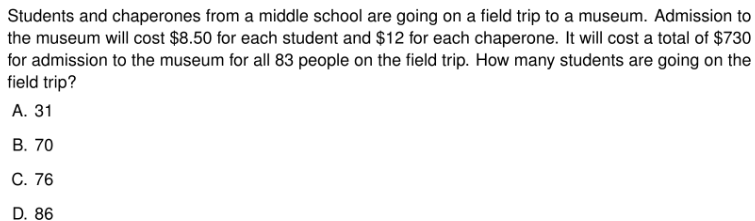
Here we have a word problem but we are not given the equations. Let’s create them first. In word problems like these, we have one equation to represent the total number of things (in this case, admission) and we have another question to represent the total cost. Our first equation, then, will be the total number of people going on the field trip, 83, which we know has to be equal to the number of students added to the number of chaperones. Therefore, s + c = 83. Our second equation comes from the total cost of $730 being equal to the cost of all student admissions added to the cost of all chaperone admissions. This gives us 8.50s + 12c = 730. We can solve this by hand as well, but here is where we can use the hybrid method to save a little time. Note that we have to change the variables to x and y in order to plug into DESMOS here, so make sure you keep track of which variable represents the students.
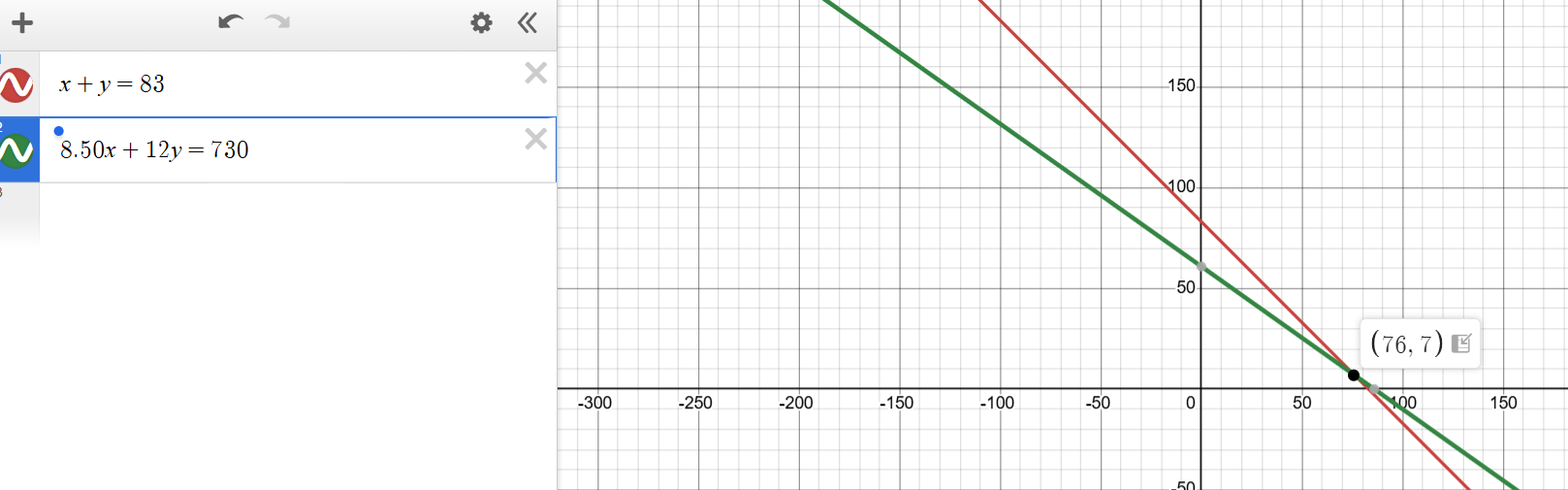
Our intersection is at (76, 7), which means our x value is 76 and our y value is 7. We are being asked for the number of students, which we decided was represented by x (this can be seen in the equation on DESMOS where we changed 8.50s to 8.50x). Our final answer is 76.
There are many cases where DESMOS will be your best friend on the DSAT. Here are some popular ones:
- Solving Equations with One Variable
- Solving Systems of Equations/Inequalities
- Finding the Equation of a Line
- Finding X and Y-Intercepts
- Finding Mean, Median
- Equivalent Expressions
Some instances require you to use your algebra or geometry skills without the assistance of a calculator. Certain questions will require you to use a scientific calculator, which can also be through DESMOS or your own handheld calculator. Occasionally, there will be a question that requires some combination of these methods. It is up to you to decide how to spend your time on test day. In the beginning, we discussed the 95-second rule. If you think DESMOS will be quicker than the 95 seconds you are given per question, then you should use it. If you think you can use mental math or some scratch work to solve the problem faster, that should be your method of choice.
If you need help deciding how or when to use DESMOS, or you would like assistance preparing for an upcoming DSAT, please contact us.
Post a Comment
You must be logged in to post a comment.